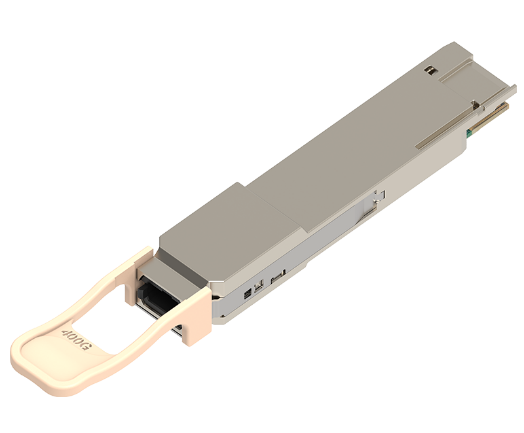



SFP ports, also known as Small Form-factor Pluggable ports, are essential components in various network and storage devices, including switches, servers, routers, and Network Interface Cards (NICs). These ports cater to diverse network requirements, especially common in large-scale computer network switches. Particularly in gigabit switches, multiple SFP ports are typically equipped to enhance network connectivity. But what exactly is the role of SFP ports on gigabit switches? How do they differ from RJ45 ports? This article will introduce basic information about SFP ports on gigabit switches.
What are SFP Ports on Gigabit Switches?
SFP ports on gigabit switches are slots designed to work with Small Form-factor Pluggable (SFP) connectors for data transmission. They provide high speed and physical compactness. SFP ports enable fiber optic or copper cable links by inserting corresponding SFP modules (either fiber SFP or copper SFP) into gigabit switches.
The only difference between SFP ports and electrical ports lies in the physical layer (medium), meaning SFP ports can accommodate SFP modules for both optical and electrical ports, requiring fiber optic or copper wires to achieve data transmission.
When an SFP module is inserted into a gigabit switch with electrical ports, data transmission must use network cables such as Cat5e/Cat6/Cat7. However, when an SFP module is inserted into a gigabit switch with optical ports, fiber optic cables are necessary to support the connection. Therefore, RJ45 SFP modules are typically used for short-distance uplink connections, linking full SFP distributed switches to all-copper edge switches. Meanwhile, fiber optic SFP modules are most commonly used for longer-distance high-speed fiber uplink connections.
Common Types of SFP Ports
Combo SFP Ports
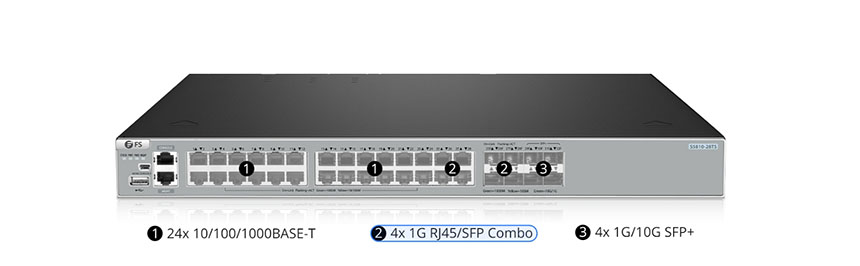
Combo ports are multifunctional interfaces supporting both copper and fiber SFP connections. They serve as composite ports capable of accommodating two different physical ports: RJ45 ports and SFP ports. Users can flexibly utilize RJ45 or SFP ports according to their needs.
However, it’s important to note that two different SFP ports cannot be used simultaneously. Each combo SFP port functions as a single interface, offering two connection options. One option is for RJ-45 connections with copper Ethernet cables, and the other option is for SFP connections with fiber optic cables. For example, when using combo SFP ports in gigabit switches, the corresponding copper ports cannot be used, and vice versa.
Walsun is a professional provider of communication and high-speed network system solutions, offering the S5810-28TS switch. This advanced switch features 4 1G RJ45/SFP combo ports and 4 1G/10G SFP+ ports, providing flexible connection options and improved performance.
SFP Uplink Ports
Uplink ports are used to aggregate to higher-level links, designed for internal switch connections using standard straight-through cables (rather than crossover cables). Therefore, uplink SFP ports can connect to regular ports of another device.
In a traditional three-layer network topology, from bottom to top, there are access layer, distribution layer, and core layer. This means there are access, distribution, and core switches. Typically, SFP downlink ports are used to connect terminal devices like laptops and PCs.
Thus, uplink SFP ports are used to connect to higher layers in network topology. This also means connecting to higher-speed switches such as 10G SFP+, 25G SFP28, 40G QSFP+, and 100G QSFP28.
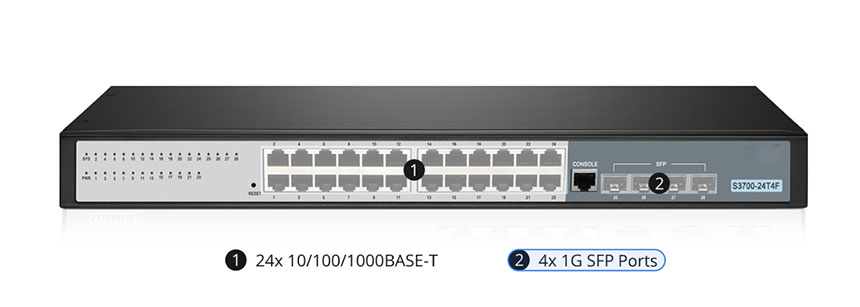
For example, in the S3700-24T4F switch, it features 4 1Gb SFP uplink ports, offering high bandwidth, flexible connection options, and scalability.
Why SFP Ports are Important
Long-distance High-speed Data Connections
SFP ports on switches are ideal for long-distance transmission and high-speed data transfer. They become crucial when connecting devices located in different buildings or distant locations. By utilizing fiber optic cables, these ports facilitate easy transmission over long distances. This makes them highly useful in scenarios requiring seamless connectivity across large physical areas. Additionally, SFP ports excel in facilitating high-speed data transfers essential for bandwidth-intensive tasks such as streaming HD movies or operating data centers. These ports provide the necessary bandwidth and performance to ensure uninterrupted, smooth operation of such demanding applications. Using SFP ports allows for heavy-duty data transmission without compromising speed or reliability.
Interoperability and Compatibility
SFP ports offer high flexibility and compatibility as they can accommodate various SFP transceiver modules. This adaptability allows them to work with different types of networks and protocols, making it easier to integrate SFP ports into existing infrastructure and ensure smooth interoperability.
Redundancy and Failover Capability
SFP ports can be used to establish redundancy and failover mechanisms within the network. By connecting additional SFP ports to various switches or routers, backup connections can be created. This ensures network continuity and minimizes downtime in case of primary connection failure.
SFP Ports on Gigabit Switches vs. RJ45 Ports
In addition to SFP ports, gigabit switches typically come with built-in RJ45 ports to allow plug-and-play Ethernet copper cable connections. Here, we will discuss the differences between SFP ports and RJ45 ports on gigabit switches.
Connection Types
This is the most fundamental difference determining many other features between RJ45 ports and SFP ports, so we’ll start with it. RJ45 ports support only Ethernet cables (Cat5e/Cat6/Cat7) for 1Gbit/s transmission, with a distance limit of 100 meters (330 feet). Therefore, they are typically used for connecting computers or routers. On the other hand, for SFP switches, SFP ports are more versatile, capable of accepting fiber optic cables (single-mode and multi-mode) with fiber SFP modules, as well as copper SFP modules with Cat5e, Cat6, Cat7, Cat8 cables. This means SFP ports support more types of communication cables and longer link distances.
Maximum Distance
Due to the different connections used by RJ45 and SFP ports, there is a significant difference in maximum transmission distances. RJ45 ports support a maximum distance of 100 meters, which is more than sufficient for home or small office networks.
SFP ports allow for greater distances. MMF cables connected to SFP ports can reach 550-600 meters, while SMF cables can reach up to 150 kilometers. If using Cat5 cables for connection, SFP ports are limited to 100 meters.
For short-distance links on gigabit switches, there is no difference whether you use SFP ports or RJ45 ports to connect Ethernet switches. If you don’t plan to connect servers via fiber optic links in the near future, you don’t need an SFP port switch, and you can continue to use standard 1000BASE-T.
| Feature | RJ45 Port | SFP Port |
| Physical Connection | Connected via RJ45 socket | Connected via hot-swappable SFP modules |
| Transmission Speed | Typically supports 10/100/1000 Mbps speeds | Can support various speeds like 1 Gbps, 10 Gbps, etc. |
| Maximum Transmission Distance | Up to 100 meters | Depends on the SFP module and cable used; can be up to 150 kilometers with single-mode fiber |
| Flexibility | Limited to Ethernet cables only | High flexibility with various SFP modules and cables |
In summary, SFP ports on gigabit switches are highly versatile and suitable for various network requirements. They provide options for both short and long-distance connections, supporting high-speed data transmission with fiber optic or copper cables. RJ45 ports, on the other hand, are limited to Ethernet connections over shorter distances. The choice between SFP ports and RJ45 ports depends on specific network needs, such as distance, speed, and the type of cables used.”